MCP Servers
Connect your agents to external tools and data sources via MCP
MCP (Model Context Protocol) lets your coding agents connect to external tools and data sources — databases, APIs, browsers, and more. Emdash manages MCP server configs across all your installed agents from a single place, so you configure once and each selected installed agent picks it up.
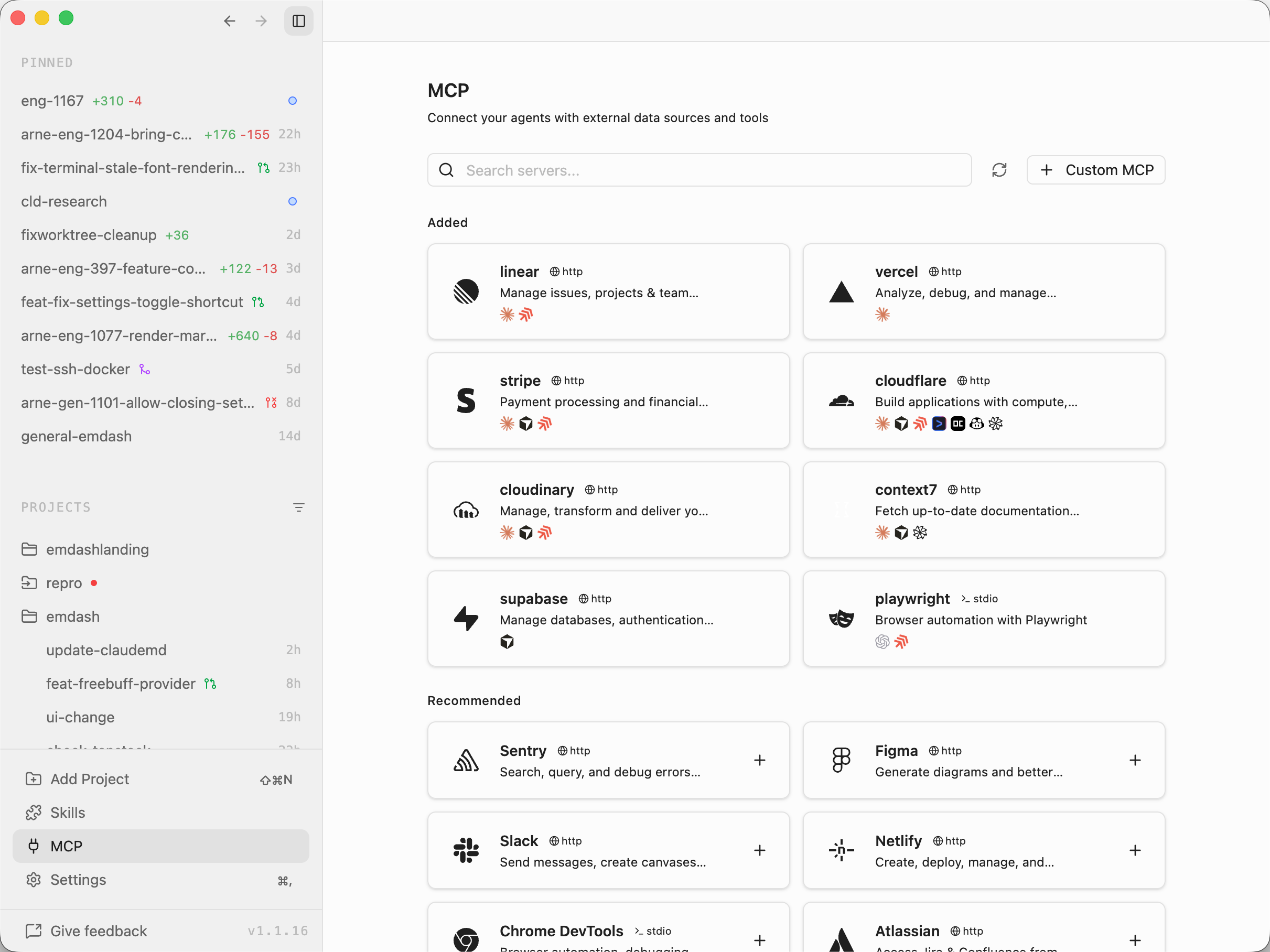
Getting Started
Open Library from the left sidebar, then select MCP. You'll see two sections:
- Added — servers you've already configured
- Recommended — a curated catalog of popular MCP servers ready to add
Use the search box to filter by name or description.
Adding a Server from the Catalog
- Find a server in the Recommended section (e.g. Playwright, Supabase, Sentry)
- Click Add on the card
- The modal opens pre-filled with the server's default config
- Fill in any required credentials (highlighted and labeled Required or Optional)
- Select which installed agents to sync to under Sync to agents
- Click Add
Emdash writes the config into each selected agent's native config file. The server is available in your next agent session.
Adding a Custom Server
- Click Custom MCP in the toolbar
- Enter a name and choose the transport type:
- stdio — runs a local process (provide a command and optional arguments)
- http — connects to a remote URL (provide the endpoint and optional headers)
- Add any environment variables the server needs
- Select target agents and click Add
Editing and Removing
Click an installed server card to edit its config — change credentials, update the URL, or adjust which agents it syncs to. Click Remove to delete the server from all agents.
Agent Sync
When you add or edit a server, Emdash translates the config into each agent's native format and writes it to the correct location:
Internally, Emdash normalizes MCP configs into a shared format, adapts them per agent, and writes each agent's native config file. This means the same server can also work when you run those agents outside Emdash.
| Agent | Config file |
|---|---|
| Claude Code | ~/.claude.json |
| Cursor | ~/.cursor/mcp.json |
| Codex | ~/.codex/config.toml |
| Amp | ~/.config/amp/settings.json |
| Gemini | ~/.gemini/settings.json |
| Qwen | ~/.qwen/settings.json |
| OpenCode | ~/.config/opencode/opencode.json |
| GitHub Copilot | ~/.copilot/mcp-config.json |
| Grok | ~/.grok/config.toml |
| MiMo Code | ~/.config/mimocode/mimocode.json |
| Droid | ~/.factory/mcp.json |
| Charm | ~/.config/crush/crush.json |
Transport Compatibility
MCP servers use one of two transports: stdio (local process) or http (remote URL). Transport support varies by agent, based on each agent's declared capabilities — don't assume every provider supports the same transports. When adding an HTTP server, agents that don't support HTTP are automatically disabled in the agent selector.
Catalog Servers
The built-in catalog includes 54 servers for common services:
- Browser & DevTools: Playwright, Chrome DevTools
- Databases & Data: Supabase, PlanetScale, Prisma, MongoDB, MotherDuck, BigQuery
- Hosting & Infrastructure: Vercel, Netlify, Cloudflare, Railway, Azure MCP Server, AWS Marketplace
- Monitoring & Analytics: Sentry, PostHog, Honeycomb, Axiom, Amplitude
- Project Management: Linear, Asana, ClickUp, monday.com, Graphite, Notion, Atlassian (Jira/Confluence)
- Design & Content: Figma, Canva, Miro, Webflow, Sanity, Cloudinary, WordPress, Shopify Dev
- Communication: Slack, Intercom
- Payments & Auth: Stripe, Clerk
- AI & Search: Hugging Face, OpenRouter, Exa, Context7
- Automation: Make
Each catalog entry includes a link to the server's documentation for setup details.
Tips
- You can sync a single MCP server to multiple agents at once — no need to configure each one separately.
- Environment variables with credential keys are highlighted in the modal so you know what to fill in.
- Click Refresh to re-detect installed agents if you've installed a new CLI since opening Emdash.